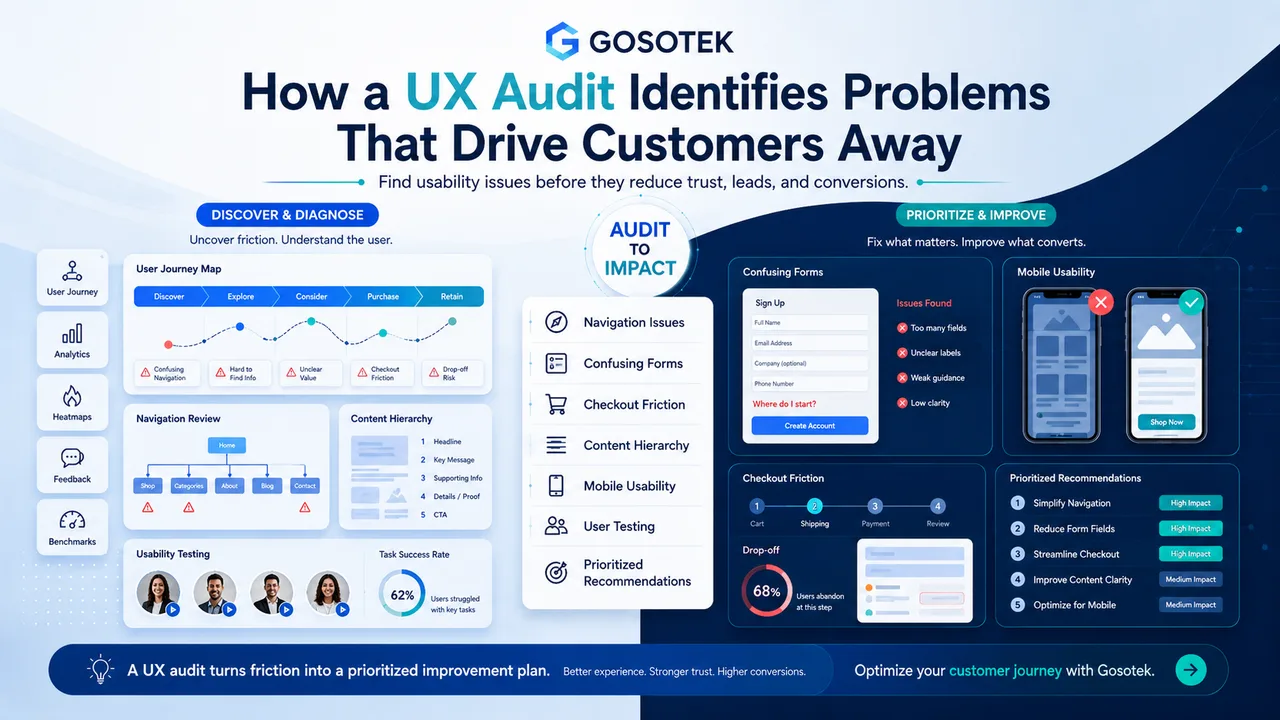
Customers rarely report every confusing interaction. They simply leave, abandon a form, delay a purchase or contact support. A UX audit investigates these signals and identifies where a website or application creates unnecessary effort.
Unlike a visual redesign, an audit begins with evidence and produces prioritized recommendations.
What Does a UX Audit Review?
Navigation and Information Architecture
The audit checks whether users can predict where information is located. It examines menu labels, page grouping, search, breadcrumbs and internal links. A common problem is organizing navigation around internal departments rather than customer needs.
Content Hierarchy
Pages should communicate their purpose, value and next step quickly. An audit reviews headings, readability, proof points and calls to action. A service page may hide its main benefit below company history and generic introductions.
Forms and Error Handling
Forms are assessed for unnecessary fields, unclear labels, confusing validation, password rules, error recovery and completion feedback. A form that clears entered information after one error creates avoidable frustration.
Checkout and Conversion Friction
For transactional products, the audit follows the path from product discovery to confirmation. It checks pricing clarity, delivery information, account requirements, payment choices and trust signals.
Mobile Usability
The review covers tap targets, menus, sticky elements, content order, forms and realistic screen sizes. A page that technically fits a phone can still be difficult to use.
Interaction Consistency
Buttons, links, filters, tabs and dialogs should behave predictably. When similar controls work differently, users must relearn the interface.
How a Professional UX Audit Works
| Stage | Main activity | Output |
|---|---|---|
| Goal setting | Define objectives and critical journeys | Scope and success criteria |
| Evidence review | Examine analytics, recordings and feedback | Behavioural patterns |
| Expert evaluation | Review usability and interface structure | Documented findings |
| Journey testing | Complete key tasks across devices | Friction and failure paths |
| User testing | Observe representative users where appropriate | Direct evidence |
| Prioritization | Rank issues by severity, reach and effort | Actionable roadmap |
Why Prioritization Matters
A report containing dozens of unranked observations is difficult to use. Each finding should explain where the problem occurs, who it affects, the evidence, recommended action and implementation priority.
This separates critical blockers from minor polish. A checkout failure deserves attention before decorative inconsistency on a low-traffic page.
Common UX Audit Mistakes
One mistake is relying only on personal opinion. Another is treating analytics as a complete explanation: data may show where users leave without showing why.
Auditing only the homepage is also insufficient. Valuable journeys often cross landing pages, forms, dashboards, payment screens and confirmation states.
Gosotek connects recommendations to user tasks and business objectives. We also separate quick improvements from structural changes so teams can act in phases.
When Should You Conduct a UX Audit?
Consider an audit before a redesign, after a major product change, when conversions decline, complaints repeat or traffic produces weak results.
It is also useful before investing in new features.
Frequently Asked Questions
Is a UX audit the same as usability testing?
No. User testing is one method. An audit can also review analytics, structure, content and interaction patterns.
Do we need analytics?
Analytics strengthen the evidence, but expert and journey reviews can still identify meaningful issues.
Will the audit include design solutions?
A useful audit includes clear recommendations and may include wireframes or revised flows, depending on the scope.
Can a small website benefit?
Yes. The audit can focus on a few critical journeys, such as service discovery and enquiry submission.
Should an audit happen before a redesign?
Usually, yes. It helps prevent old problems from being rebuilt in a new visual style.
Conclusion
A UX audit turns scattered customer friction into a prioritized improvement plan. It explains what is wrong, why it matters and what to address first.