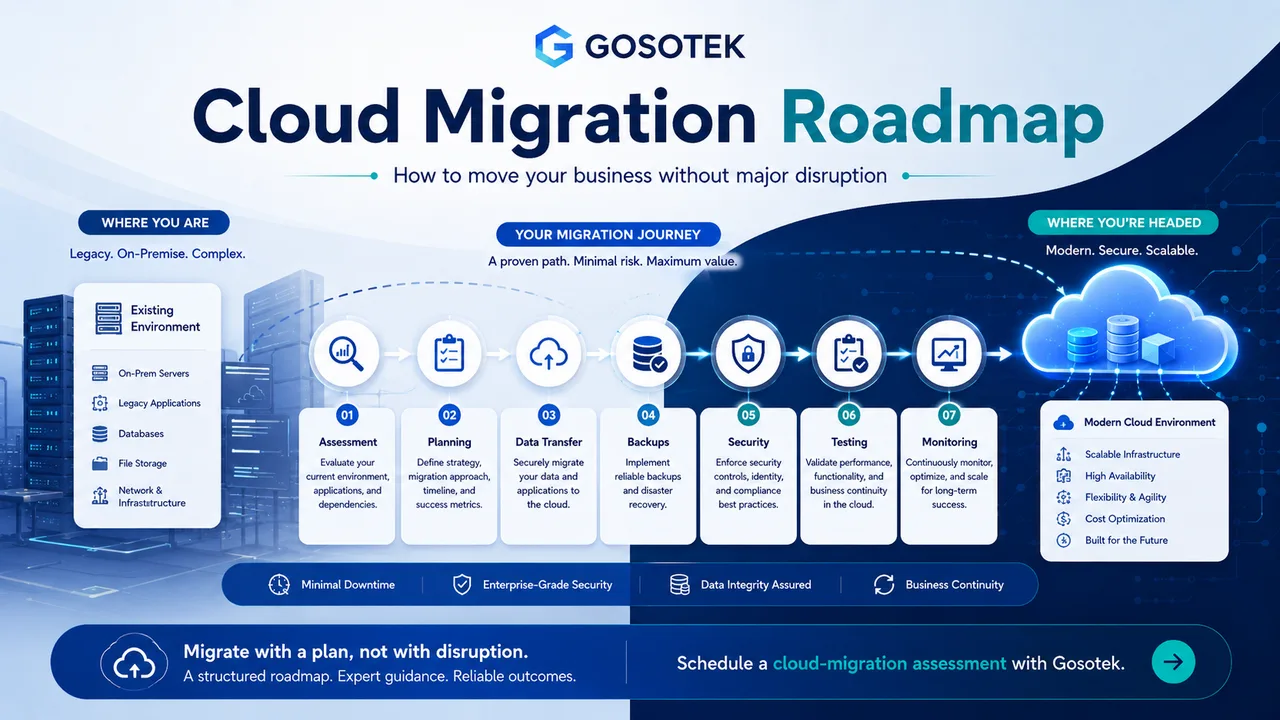
Cloud migration can improve scalability, recovery and infrastructure flexibility, but a rushed move can create downtime, missing data or unexpected costs.
Treat migration as a controlled business change, not a simple server copy. Google Cloud’s migration guidance similarly recommends carefully assessing, planning, deploying and optimizing workloads rather than treating migration as a single transfer.
Official reference: Google Cloud - Migration to Google Cloud: Getting Started
1. Assess the Existing Environment
Create an inventory of applications, servers, databases, storage, integrations, licences and user groups. Record performance, operating cost, security requirements and acceptable downtime.
Map dependencies before deciding the sequence. A customer portal may rely on an API, database, identity service, payment gateway and scheduled jobs. Moving one component alone can break the workflow.
2. Select the Migration Approach
| Approach | Meaning | Suitable when |
|---|---|---|
| Rehost | Move with limited changes | Speed matters and the application is cloud-compatible |
| Replatform | Make selected improvements | Managed services can reduce maintenance |
| Refactor | Redesign part of the application | Better scalability or resilience is required |
| Retain | Keep it in place | Dependencies, regulation or timing prevent migration |
| Retire | Remove it | The system is unused or duplicated |
Choose according to business value, risk, timeline and total cost - not only migration speed.
3. Build the Cloud Foundation
Before moving production systems, configure accounts, networks, identity, permissions, encryption, logging, monitoring, backups and cost controls.
Define naming, tagging and ownership standards. A structured landing environment makes future growth easier to manage. Current landing-zone guidance places identity, resource management, networking and security among the core foundation areas.
Official reference: Google Cloud - Landing Zones
4. Plan Data Transfer and Backups
Choose an online, private-network or offline transfer method based on data volume, sensitivity, bandwidth and the migration window.
Take verified backups and test restoration. For critical databases, use replication or synchronization so source and cloud data remain aligned until cutover.
Migration plans should document the transfer route, workload dependencies and the order in which related systems will move.
Official reference: Microsoft Cloud Adoption Framework - Migrate
5. Reduce Downtime With Migration Waves
Start with a low-risk pilot, such as a development environment or internal application. Use the results to improve scripts, monitoring and rollback procedures.
Move related components together in planned waves. Schedule critical cutovers outside peak periods and define clear go/no-go criteria.
Near-zero-downtime migration may use continuous replication and a controlled switch to the new environment. Critical systems should also have tested rollback criteria and documented recovery procedures.
Official reference: Microsoft Cloud Adoption Framework - Migrate
6. Test Before Cutover
Validate:
Application functions and integrations.
Data accuracy and user access.
Performance under expected load.
Backup, recovery and rollback.
Security controls and alerts.
Include business users in acceptance testing. A technically successful move can still fail when important workflows do not operate correctly.
7. Monitor After Migration
After cutover, monitor errors, latency, resource usage, security events and cost. Keep the old environment only for the approved rollback period, then decommission it securely to prevent duplicate spending.
Review whether autoscaling, managed databases, serverless services or better storage policies could improve the new setup. Post-migration optimization should be treated as a repeated cycle rather than a final one-time task.
Official reference: Google Cloud - Optimizing Your Environment After Migration
Common Migration Mistakes
Typical problems include incomplete dependency mapping, moving everything at once, weak backups, no rollback plan, insufficient testing and keeping both environments active indefinitely.
The Gosotek Perspective
Gosotek defines success criteria for availability, performance, recovery, security and cost before execution. We prefer staged migration, tested rollback and documented ownership over a risky “big bang” move.
FAQs
How long does cloud migration take?
It depends on workload count, data volume, dependencies, testing and downtime limits.
Can migration happen without downtime?
Near-zero downtime is possible for many workloads, but it requires replication, testing and controlled cutover.
Should every application move?
No. Some systems should be retained, replaced or retired after assessment.
What happens after migration?
Teams monitor performance, security, backups, spending and user issues, then optimize the environment.
Conclusion
Cloud migration becomes safer when assessment, sequencing, backups, testing and rollback are planned before the first production move.