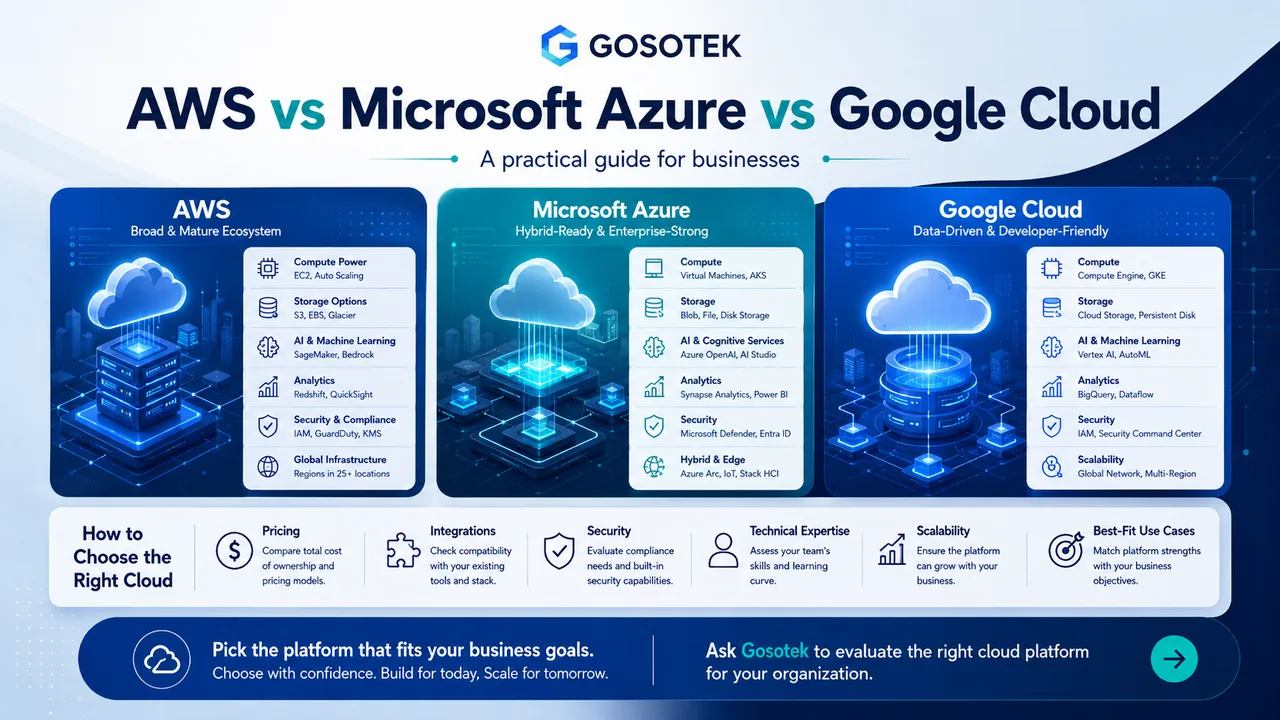
AWS, Microsoft Azure and Google Cloud can all host applications, databases, storage, networks, analytics and AI workloads. The practical question is which platform fits your systems, team and operating model.
Quick Comparison
| Platform | Common strengths | Often suitable for |
|---|---|---|
| AWS | Broad service range and mature architecture options | SaaS, e-commerce, startups and mixed enterprise workloads |
| Microsoft Azure | Microsoft integration and hybrid management | Businesses using Windows Server, SQL Server, Microsoft 365 or .NET |
| Google Cloud | Data, AI, containers and managed cloud-native services | Analytics-heavy products, Kubernetes and AI applications |
These are tendencies, not limits.
Capabilities and Integrations
AWS provides infrastructure and managed services for compute, storage, databases, networking, serverless applications, security and machine learning.
Official reference: AWS - What is AWS?
Azure offers similar capabilities and can reduce integration effort for organizations already using Microsoft identity, Windows, SQL Server, Power Platform or .NET. Tools such as Azure Arc can also manage servers and virtual machines outside Azure, making the platform relevant for hybrid environments.
Official reference: Microsoft Azure
Google Cloud offers virtual machines, storage, managed databases, Cloud Run, Google Kubernetes Engine, BigQuery, API management and AI services. It is frequently evaluated for data platforms, containerized applications and machine-learning projects.
Official reference: Google Cloud
Pricing: Compare Total Cost, Not One Service
All three platforms provide consumption-based pricing and commitment options for predictable usage. A useful estimate must include:
Compute hours and machine type.
Storage tier, retention and backup.
Database licences and management.
Data transfer between regions and the internet.
Monitoring, security and support.
Internal engineering effort.
A cheaper virtual machine does not automatically create a cheaper platform. Managed services may have a higher direct price but reduce patching, maintenance and staffing work.
Each provider offers pricing tools, but calculations remain estimates because final costs depend on actual architecture and consumption.
Official reference: AWS Pricing overview
Security, Scalability and Expertise
AWS, Azure and Google Cloud provide identity controls, encryption, network protection, logging, monitoring and security-management services. Security still depends on correct configuration, governance and daily operations.
Official reference: AWS Shared Responsibility Model
All three can scale from a small application to enterprise workloads. Selection should consider user locations, latency, availability targets, recovery needs and how the application handles demand.
Team capability matters as much as technology. A platform requiring complete retraining can delay delivery and increase operational risk.
Platform-Selection Checklist
Which applications, databases and licences already exist?
Is hybrid or multi-cloud connectivity genuinely required?
What performance, region and compliance rules apply?
Which managed services could reduce maintenance?
What is the realistic three-year operating cost?
Can the team secure and monitor the environment?
Common Mistake
Do not select a provider because a competitor uses it or one rate looks lower. Test a representative workload and compare architecture, support, data transfer and operational effort.
The Gosotek Perspective
Gosotek starts with the workload and business outcome, not the provider logo. We evaluate integration effort, security, scalability, available skills and total cost before recommending AWS, Azure, Google Cloud or a justified hybrid approach.
FAQs
Which cloud platform is cheapest?
There is no permanently cheapest option. Cost varies by region, architecture, licences, commitments and usage.
Is Azure automatically best for Microsoft users?
It may reduce integration effort, but AWS and Google Cloud also support Microsoft workloads.
Is Google Cloud only for AI and analytics?
No. It also provides general application hosting, storage, databases and networking.
Should a business use multiple clouds?
Only for a clear requirement. Multi-cloud adds governance, networking, security and skills complexity.
Conclusion
The best cloud platform is the one that fits your applications, people, integrations, risk profile and total operating cost.